Stop your robot vacuum from getting stuck under furniture
· Editorial team newswithlauraseattle.com
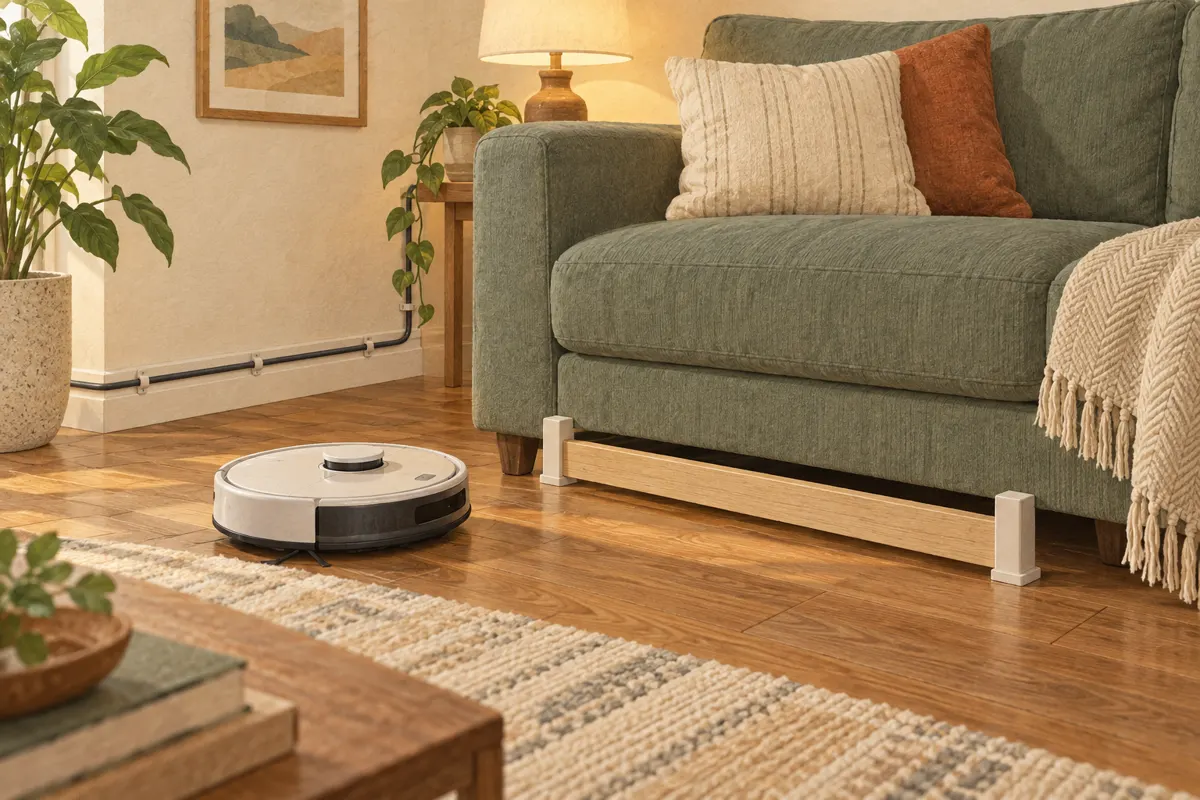
To stop your robot vacuum from getting stuck under furniture, remove loose cords and objects, check the clearance along its whole route, and block openings it cannot safely navigate. Use app-based no-go zones if your model supports them, or a secure removable barrier. If it struggles in open areas too, check its wheels, brush, and sensors before changing the room.
Find the exact point where it gets trapped
Watch a cleaning run near the problem furniture. The useful clue is what happens just before the robot stops: its top catches an underside, a wheel meets a furniture support, or a cord winds around the brush. Narrow spaces, floor clutter, and tangled moving parts are all possible causes, so identify the obstruction before choosing a fix.
- Note which side of the sofa, bed, or cabinet the robot enters.
- Look for low rails, sagging fabric, furniture feet, and objects hidden underneath.
- Check whether it stops at the same point or struggles in several places.
- Pause the robot before freeing it, following its operating instructions.
Editorial proposal: keep a short note of the location and obstruction after each rescue. A repeated snag at one opening suggests that opening needs attention; trouble across the room calls for a broader check.
Clear cords and loose items from the route
Check beneath furniture as well as the visible floor. Charging cables, socks, toys, and strings can obstruct the robot or become tangled in its brush and wheels. Clearing these items and organizing cables is a practical first step, even when the furniture itself appears to be the problem.
- Pause cleaning and remove loose objects from beneath the problem furniture.
- Move trailing cables out of the cleaning route and use suitable cable organizers to keep them there.
- Check that the robot cannot reach a hanging cable loop from the edge of the furniture.
- Run it through the cleared area while watching for another obstruction.
Editorial proposal: make this a quick check before scheduled cleaning. Pay particular attention after moving chargers or furniture, since the route may have changed since the last successful run.
Measure the lowest clearance, not just the entrance
An opening can look roomy while concealing a lower support farther underneath. Editorial proposal: compare the robot’s full height with the lowest accessible part of the furniture, including any raised housing on top of the vacuum. Measure along the likely route rather than relying on the gap at the front edge.
- Use the model’s stated dimensions as a starting point, then check the actual unit.
- Measure under crossbars and other low points the robot could reach.
- Account for a rug or other floor covering beneath the furniture.
- Treat a gap that barely accommodates the robot as a place to exclude until you can verify reliable passage.
Avoid adopting a universal clearance number: the supplied source gives none, and the relevant dimensions depend on your robot and furniture. If the robot repeatedly wedges beneath a low section, blocking access is a straightforward option.
Use a supported no-go zone or removable barrier
If your vacuum supports no-go zones, use its app to exclude the troublesome area. Supported virtual walls or physical barriers are other options for keeping a robot out of narrow spaces. Check your model’s instructions to see which methods it accepts.
- Identify every opening through which the robot can reach the snag point.
- Set a supported exclusion zone, or place a removable barrier across the accessible opening.
- For a physical barrier, choose something stable that does not introduce loose fabric, cords, or small objects into the route.
- Watch the next run and adjust the exclusion if the robot still reaches the obstruction.
The barrier placement and watched verification above are editorial proposals. Keep access convenient enough that you can remove the barrier and clean beneath the furniture yourself when needed.
Check the robot if problems continue elsewhere
Hair, pet fur, and strings tangled around the wheels or roller brush can restrict movement. Dirty sensors can also interfere with navigation. Follow the manufacturer’s instructions to remove debris and clean sensors, using the supplied cleaning tool where appropriate.
Editorial proposal: after maintenance, watch a short run in a clear area before returning the robot to the furniture. If it still turns repeatedly, stops, or struggles away from obstacles, record any error message and consult the model’s troubleshooting guidance. That helps distinguish a recurring furniture snag from a problem with the robot’s movement.